How a comment travels
You write a comment on a page. It is saved once, then shown in three places.
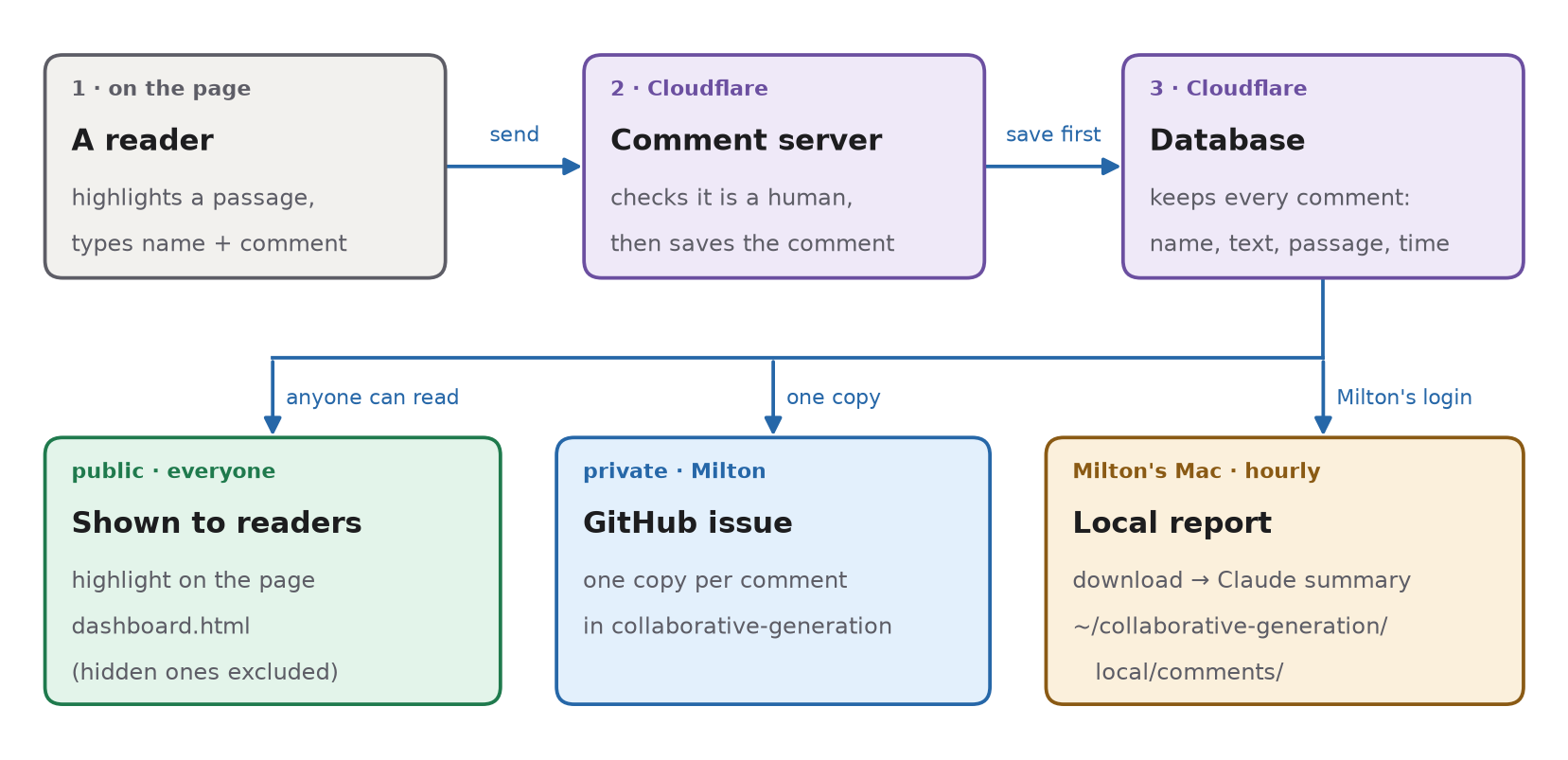
The steps
- Write. Highlight text on an Iwahori page and press 💬 Comment. Type a name and the comment;
$x^2$becomes math. - Check and save. A small program on Cloudflare checks you are a person, not a bot, and stores the comment in its database. Nothing else happens until it is saved.
- Show. Every reader now sees the passage highlighted; clicking it opens the comment. The dashboard lists all comments by person. Milton gets a private GitHub copy, and his Mac downloads everything each hour.
Comments are public. Milton can hide one from the page; it stays in the database. No GitHub account is needed to comment, and commenting works only on the published site.
Words on this page
- Cloudflare
- A company whose servers run the comment server and the database.
- Comment server
- A short program (a “Worker”) that receives comments and answers “which comments are on this page?”
- Database
- Cloudflare’s storage (“D1”): one row per comment with name, text, passage and time.
- Human check
- Cloudflare Turnstile, the “checking you are not a bot” box.
- GitHub issue
- A private copy in the
collaborative-generationrepository, so Milton is notified.
How names are remembered
You type a name → Comment → comment server
    → shared name list in the database → suggested in everyone’s Name box
Your browser also remembers the last name you used.
The ? next to Name shows this. Names are labels, not logins: anyone can type any name. Your browser also keeps an unsent draft so it survives a reload.
For Milton: the local report
Each hour, while the Mac is awake, it downloads every comment (hidden ones too) and asks Claude for a one-line summary of anything new. Open ~/collaborative-generation/local/comments/index.html. That folder is never pushed.
Commands
# download now and refresh the report (or double-click sync-comments.command)
python3 subpages/case-study-1-ramifiedrelative/proof_graphs/collaboration/comment-service/sync-comments.py
# install / stop the daily job (07:00)
python3 subpages/case-study-1-ramifiedrelative/proof_graphs/collaboration/comment-service/install-comment-sync.py
python3 subpages/case-study-1-ramifiedrelative/proof_graphs/collaboration/comment-service/install-comment-sync.py --disable
# hide a comment from the page
npx wrangler@4 d1 execute trees-page-comments --remote --command "UPDATE comments SET hidden=1 WHERE id='…'"
If a download fails, the last report stays. Expired logins: npx wrangler@4 login, claude auth login.
What is in the folder
~/collaborative-generation/local/comments/
  index.html        the report: search, summaries, originals
  comments.json     every comment downloaded so far
  report.json       Claude’s summaries
  archive/          a dated copy whenever comments change
  reports/          each dated report
  sync.log          what each daily run did